
Lotus365 Blue APK refers to an Android installation file promoted by Lotus365-related websites for accessing a betting-style platform outside the Google Play Store. Because APKs from unknown sources can expose your device and money to malware, and because real-money online gaming is prohibited in India, users should treat such files with extreme caution.pib.gov+2
Table of Contents
What Is Lotus365 Blue?
Lotus365 Blue is presented as a version or branding of the Lotus365 online gaming platform. Related pages describe access to a sportsbook, live events, casino games, promotions, and account settings through the same ID used on desktop.lottus365blue
In simple words, “Blue” appears to be a product label used for a particular Lotus365-related interface or access route. It is not proof of legality, official status, or safety. Users should also distinguish between similarly named versions such as Blue, Win, and VIP, since different domains may use similar branding without being the same operator.
For reference, the site’s related pages are /login/lotus365-blue/ and its Blue versus Win versus VIP comparison post.
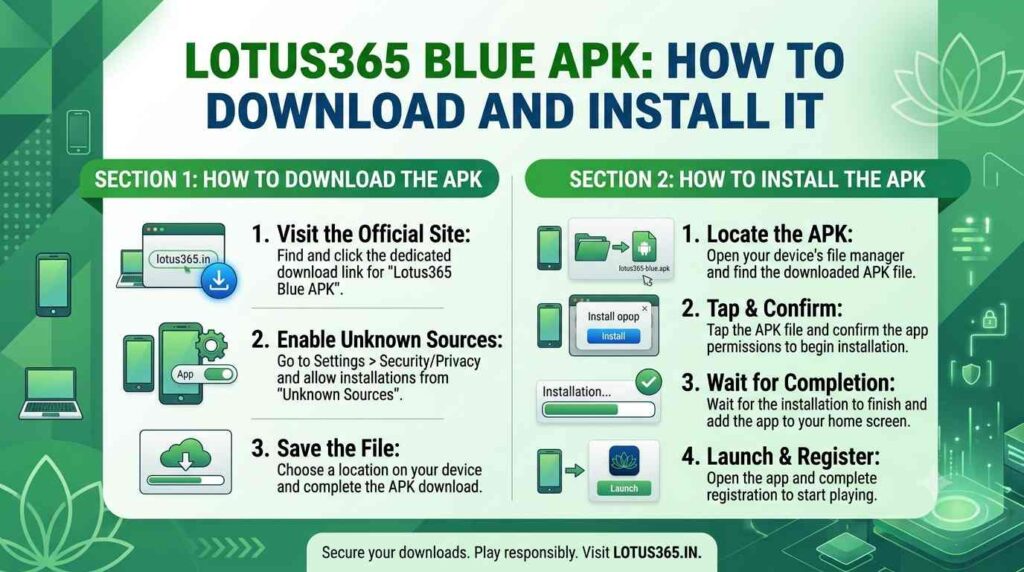
Lotus365 Blue APK Details
Websites promoting the Lotus365 Blue APK often display technical details such as version number, file size, update date, and Android compatibility. These details can change frequently and should not be treated as proof that a file is safe.
| Detail | What users may see | Important caution |
| Version | A version number such as “latest” or a numeric build | Version labels can be copied by fake APK sites. |
| File size | Usually several megabytes to tens of megabytes | File size alone cannot verify authenticity. |
| Updated date | A recent date to make the file appear current | Scammers often update dates without updating the actual file. |
| Android requirement | Android 8, 9, 10, or newer | Compatibility does not establish safety or legality. |
| Source | Direct APK link or QR code | Avoid files from unknown links, Telegram groups, or WhatsApp forwards. |
A genuine app listing normally includes a verifiable developer identity, clear privacy information, and distribution through an official app store. An APK shared through a betting website does not provide those protections.
Why APK Downloads Need Caution
An APK is an Android package file used to install an app manually. Unlike apps from the Google Play Store, APKs from websites or messaging apps are not automatically reviewed before installation.
Google describes malware as code that can risk user, data, or device security, including trojans, phishing, spyware, billing fraud, hostile downloaders, and apps that gain unauthorised control of a device. A malicious APK may:developers.google
- Steal passwords, OTPs, contacts, messages, or banking details.
- Display fake login screens to capture credentials.
- Send premium SMS messages or make unauthorised payments.
- Request unnecessary permissions such as accessibility, notifications, SMS, or device-admin access.
- Remain on the device even after the user thinks it has been removed.
Never install an APK that arrives through an unsolicited WhatsApp, Telegram, Instagram, or SMS link. Do not trust a file simply because a website calls it “official,” “safe,” or “verified.”
Google Play Protect Warnings
Google Play Protect checks apps and devices for harmful behaviour, including apps installed from outside the Play Store. It may warn users, prevent installation, disable an app, or remove it automatically if it detects potentially harmful behaviour.support.google
If Android shows a warning such as “This app is unknown to Play Protect” or recommends an app scan, do not bypass the warning. Google explains that unknown applications can pose a risk and that scanning helps reduce the chance of installing harmful software.developers.google
A common mistake is to disable Play Protect or allow “Install unknown apps” because a website tells users to do so. That removes an important safety layer and is especially risky when the app is linked to betting, UPI payments, or account credentials.
Logging In With a Blue ID
Some Lotus365-related pages instruct users to log in with a “Blue ID” after installation. For reference, the relevant page is /login/lotus365-blue/.
Users should never enter login details after following a link from an unknown message, advertisement, or agent. Fake login pages can look nearly identical to a real site and are designed to capture usernames, passwords, and OTPs.
Basic protection rules:
- Type the website address yourself rather than clicking a link.
- Check the exact domain spelling before logging in.
- Never share your password, OTP, UPI PIN, or CVV.
- Do not allow an “agent” to log in on your behalf.
- Do not save banking credentials in screenshots, chats, or notes.
If the APK Will Not Install
People often search for fixes when an APK fails to install. Common technical reasons include an incompatible Android version, an incomplete or corrupted download, insufficient storage, or a security block.
However, if an APK will not install, the safest response is not to repeatedly disable security settings or try another unknown download link. Google Play Protect may be blocking an app because it is unverified, requests sensitive permissions, or shows potentially harmful behaviour.support.google+1
Instead of troubleshooting an unknown APK, users should:
- Stop downloading additional copies.
- Do not disable Play Protect.
- Do not grant accessibility, SMS, or device-admin permissions.
- Delete the downloaded file if it came from an unverified source.
- Run a device security scan through Play Protect.support.google
For site-specific troubleshooting, the referenced support section is #7, but users should independently confirm whether any advice is safe before changing device settings.
How to Avoid Fake APKs
Fake APKs are a major risk because betting-related brands are frequently copied. Fraudsters may use similar domains, copied logos, altered spellings, Telegram groups, or QR codes to distribute malicious files.
To reduce risk:
- Do not download APKs from search ads, WhatsApp forwards, Telegram channels, or unknown websites.
- Check the exact domain carefully. A single changed character can lead to a fake site.
- Do not trust screenshots of balances, winnings, or withdrawals. These are easy to fabricate.
- Avoid apps that ask for unnecessary permissions.
- Do not pay an “activation,” “verification,” or “withdrawal-processing” fee.
- Never share OTPs, passwords, UPI PINs, or CVV.
- Keep Google Play Protect enabled. It scans apps from other sources and can warn about or remove harmful apps.support.google
If you have already installed a suspicious APK, disconnect from sensitive accounts, change important passwords from a different trusted device, and seek help from your mobile manufacturer or a trusted cybersecurity professional. If money has been lost, report it immediately through cybercrime.gov.in or by calling 1930.support.google
Safety and Responsible Gaming
Never share your password, OTP, UPI PIN, or CVV. Use only the official site—and do not bypass Android security warnings to install unknown apps.
18+ only. Play only with money you can afford to lose. For more information, see the responsible-gaming section at #3.
Frequently Asked Questions
Where can I download the Lotus365 Blue APK?
Some Lotus365-related websites promote direct APK links, but downloading betting APKs from unknown sources is risky. In India, real-money online gaming is prohibited, and its promotion and facilitation are also restricted under the 2025 law.pib.gov+1
Is the Blue APK different from the Lotus365 app?
“Blue” appears to be a branding or version label used by Lotus365-related platforms. A differently named APK does not necessarily mean a different operator, and users should not assume that any APK is official or safe without independent verification.lottus365blue
Why is the Blue APK not installing?
An APK may fail to install because of device compatibility, a corrupted file, insufficient storage, or a security block. If Google Play Protect warns against the app, do not bypass the warning; it may be flagging potentially harmful behaviour.support.google+1

Nitish is an online gaming content editor who creates guides and tutorials on sports betting platforms, exchange platforms for cricket, casino games, and website reviews for Indian audiences. He keeps up with industry news, reviews the features of the platforms, and writes informative guides on how to register and log in, how to pay and how to play responsively, as well as the latest gaming trends. He’s editorially oriented towards accuracy, clarity, and “user first content. All guides are checked to make sure the information is clearly written, up to date and adheres to the best practices found on the platforms and in the industry.